6 · Follow-ups and silence
What you will have done: understood what happens when nobody answers, paused a person, a campaign and a domain, and brought back somebody whose address bounced.
Silence is a state
Most people do not reply. The engine treats that as information, not as nothing happening.
    flowchart TD
  A["Letter one sent"] --> B{"Did they reply?"}
  B -->|"yes"| C["The sequence stops.<br/>The reply decides what happens next."]
  B -->|"no, and the gap has passed"| D["Letter two is minted"]
  D --> E{"Is it allowed to go?"}
  E -->|"domain healthy, in the window,<br/>not suppressed"| F["It sends"]
  E -->|"no"| G["It waits, and says why"]
  F --> B
  B -->|"no, and there are no steps left"| H["The sequence is finished.<br/>They stay on the list."]
The important edge: a reply stops the sequence before the next letter goes. That is why a reply cancels queued follow-ups the moment it arrives rather than when somebody reads it.
The walkthrough
1. Let it run
There is nothing to do. Each step’s gap is counted in working days from the last letter. When the gap passes and nobody has replied, the next letter is minted — and goes through exactly the same checks as the first.
If the campaign’s review policy is still counting, it waits in Approvals. If the policy has been satisfied, it goes on its own.
2. Pause one person
Open the person from Leads or from a Pipeline card and pause them. Their queued letters stop. Nothing else in the campaign changes.
Use this when somebody asks for time, or when you know something the engine does not.
3. Pause one campaign
Setup, on the campaign, switches the whole campaign off. Nothing more is minted and nothing queued is sent. Replies still arrive and are still read — pausing stops you writing to people, not people writing to you.
4. Pause one domain
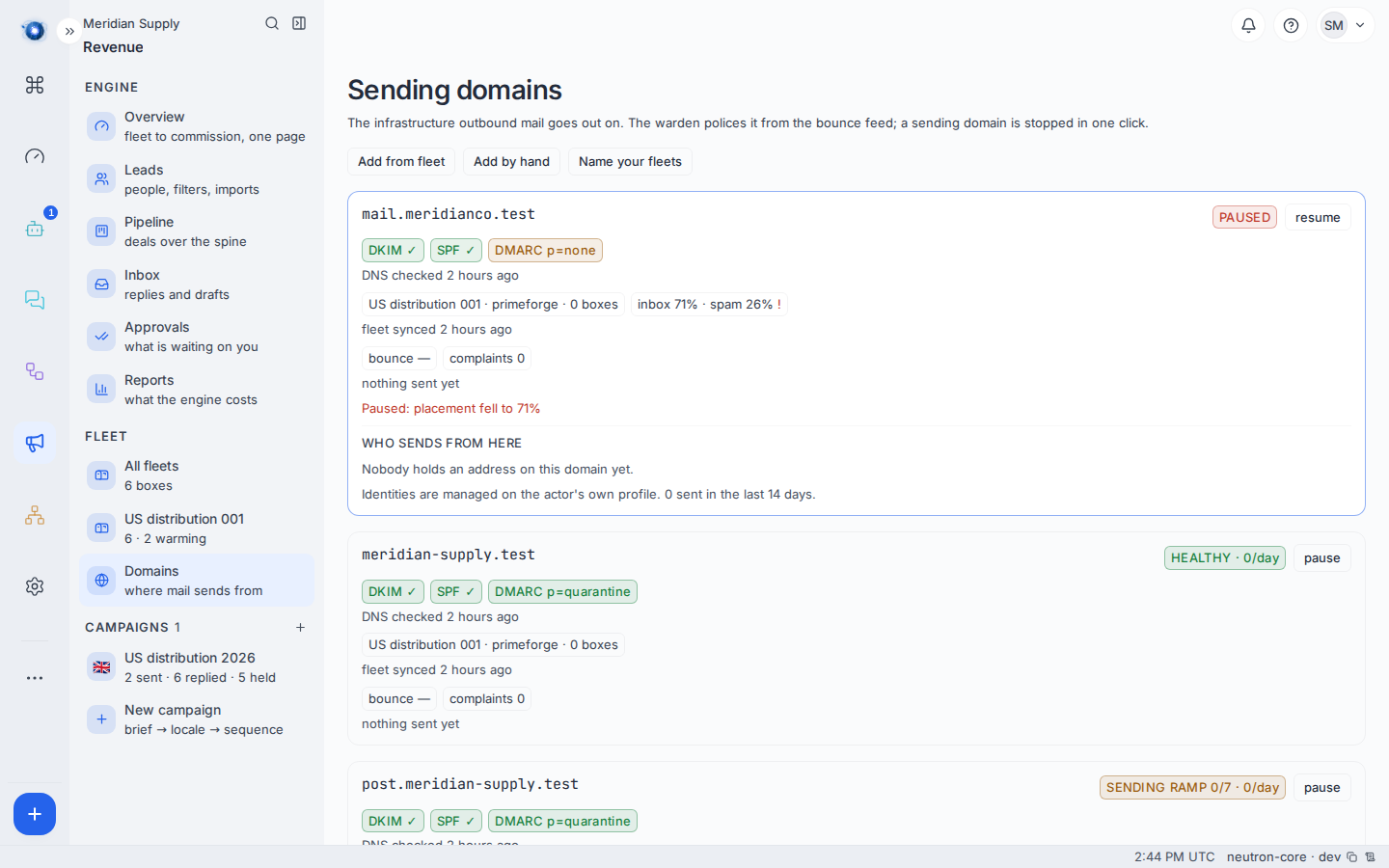
Revenue › Domains, pick the domain, pause it. Every letter that would have gone from it holds, across every campaign, with the reason no domain.
This is the blunt instrument, and the right one when something is wrong with deliverability rather than with a campaign.
5. Understand what “not now” did
A not now reply moves the next letter out ninety days. Nothing is cancelled and nobody is removed. Ninety days is long enough that the next letter is a fresh conversation rather than the same one continued, and short enough that it actually happens.
You will see the person sitting on the Pipeline with a date well in the future. That is correct.
6. Understand what a bounce did
A bounce is the receiving mail server saying the address does not exist. It is not a reply, and it is deliberately never read as one — a delivery report carries the same headers as an out-of-office, and read as one it would move the next letter a week out and go on writing to an address that is not there.
A bounced address marks the person as invalid. They stop being schedulable. They stay on the list, with the bounce on their timeline.
7. Bring a bounced person back
An address can bounce because it never existed, or because a mail server had a bad afternoon. Re-verification asks again. If the address answers this time, the person becomes verified and schedulable, and the sequence continues from the next unsent step — not from the beginning.
A worked example
Meridian Supply’s six first letters went out on a Monday. By Friday:
- Two replied. Their sequences stopped when the replies arrived.
- Three were silent. Their second letters were minted on the Thursday, four working days after the first, and went without asking — the campaign’s review policy had been satisfied by then.
- One bounced.
[email protected]does not exist. Daniel is marked invalid and nothing more is sent to him.
Two weeks later a re-verification finds a corrected address for Daniel. He becomes schedulable again and receives letter two — not letter one.
What to do if
A follow-up went to somebody who had already replied. It should not happen; a reply cancels the queue as it arrives. If you see it, note the person and the campaign — that is a real defect, not a setting.
Nothing has gone out for days and nobody has replied. Look at the campaign row in the rail. Letters counted as held are waiting on a fact, and journey 4 lists what lifts each reason.
A paused domain is still sending. It is not. What you are seeing is letters already handed to the vendor before the pause. There is no recall once a letter is on the wire.
Somebody says they never got the first letter but got the second. Both were sent; delivery is not the same as arrival. The Costs and Domains screens are where deliverability problems show, not the campaign.
You want the whole campaign to stop right now. Pause the campaign, and pause its domains as well if letters are mid-flight. The domain is the faster switch.
Confirm it worked: the person, campaign or domain you paused shows as paused, and the campaign’s counts stop moving.