9 · Let an agent work the board
What you will have done: put an agent on a project, watched it pick up work nobody had claimed, and seen where it is stopped.
The idea in one sentence
An agent is an ordinary assignee. It reads the same board, moves cards through the same door, and is refused by the same rules. With one addition: an agent does not finish its own work.
    sequenceDiagram
    participant A as An agent
    participant B as The board
    participant P as A person
    A->>B: what is ready and unclaimed?
    B-->>A: a list, highest priority first
    A->>B: claim WM-9
    Note over B: WM-9 is In progress, assigned to the agent
    A->>B: comment: what it found
    A->>B: move to Done
    B-->>A: parked in review, waiting on a person
    B->>P: it appears in their review queue
    P->>B: Approve
    Note over B: only now is it Done
The walkthrough
1. Put the agent on the project
On the org chart, select the project and use Manage → Add agent…. Membership works the same for an agent as for a person: it can read the project it is on and nothing else.
The agent also needs its work tools switched on. That is an administrator’s job, and it is the same switch as any other tool the agent holds.
2. Fill the ready queue
An agent picks up work from Ready. An item qualifies when three things are true: its status is Ready, nobody is assigned to it, and nothing is blocking it.
Ready for agents in the middle column is that list, across every project you can see, with the highest priority first.
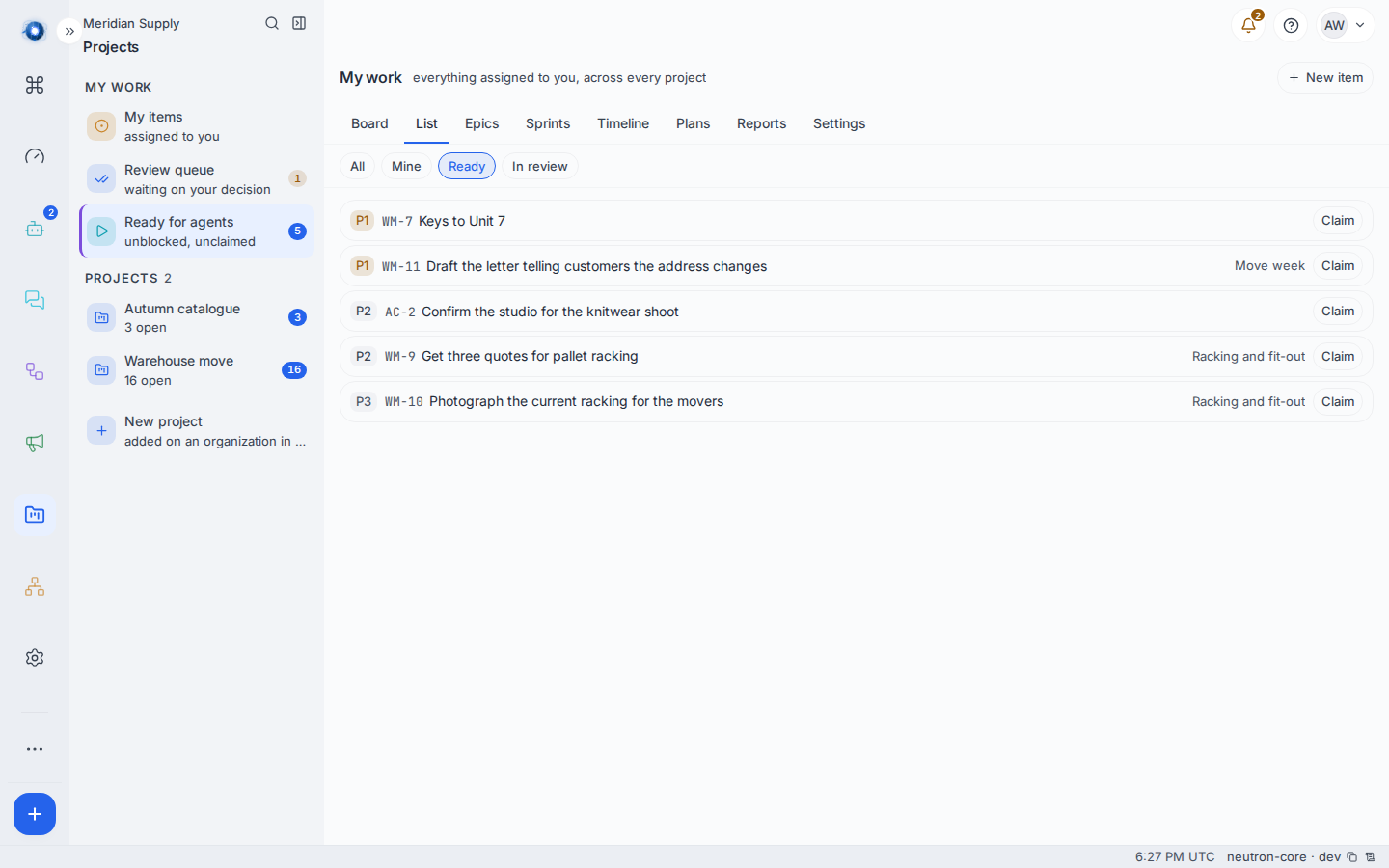
You can claim from that list yourself. Claim takes the item, marks it In progress and puts your name on it. It is exactly what the agent’s own tool does.
3. Let it work
An agent has a small set of things it can do to the board:
| What it can do | What it means |
|---|---|
| Find ready work, read one item, search | Read the board. |
| Claim | Take a ready item. It becomes In progress, assigned to the agent. |
| Create, update, move, comment, link | The same writes a person has, through the same rules. |
| Propose a sprint’s contents | A proposal, not a decision. |
The same names are available through the machine interface a developer’s command-line tools speak, so a coding session on somebody’s laptop can work the board the same way.
4. Watch where it stops
Two cards cannot be claimed by two workers. The second attempt is refused and says who holds it.
Every card an agent moves into Done parks in In review, whether or not anybody ticked Needs review on it. The agent is told so plainly: it is parked in review and waiting on a person. It is NOT done until they approve it. You do not have to remember to mark the work; a worker does not get to decide that its own work is finished.
Reordering a card that is already in Done is not entering it, so an agent tidying that column does not un-finish anything.
An agent is never a reviewer. It can ask for a decision. It cannot make one.
5. Know the one thing that is not an agent
A merged change also finishes work, and it is recorded as an agent. That one goes through to Done rather than parking, because a person pressed merge: the decision was already taken by a human hand.
The same names an agent uses are available through the machine interface a developer’s command-line tools speak. That interface signs in as a person, using their token, so work driven through it moves as that person and lands in Done like any other human move. If you want the parking behaviour, the work has to be done by an agent, not by a person’s tooling.
A worked example
Meridian Supply has one agent, called Rowan, on the warehouse project.
- Priya leaves WM-9 Get three quotes for pallet racking in Ready with nobody on it.
- Rowan asks what is ready, gets WM-9 at the top, and claims it. The card moves to In progress with a square avatar on it. Square is a machine, round is a person, and at card size the shape is easier to read than the initials.
- It comments with the three prices it found and moves the card to Done. The card parks in In review even though nobody marked it, and Priya has one more row in her review queue.
- She reads the three quotes, sees they are real, and approves. Only then is WM-9 done.
What can go wrong
| The sentence in front of you | What happened, and what to do |
|---|---|
| Somebody took this first or … took this first | Two workers reached for the same card. The other one holds it; pick another. |
| That card is already waiting on a person’s review | The agent tried to move a parked card. Somebody has to decide it first. |
| The card moved under you | The item changed between the agent reading it and writing to it. It has to read the item again and retry. |
| Cannot move from Backlog to In progress | The same rule that stops a person. Move it through Ready. |
| Blocked by … | Something the card waits on is not done. |
| Nothing is in the ready queue | Either every ready item already has an owner, or the ones that are free are blocked. The screen says which. |
| The agent says work items are not available to it | Its work tools are not switched on, or it is not a member of the project. Both are an administrator’s job. |
| An agent moved a card to Done and it went straight there | Check what actually moved it. A merged change and a person’s command-line session both finish work; only an agent’s own move parks. |
| The agent was asked to write a plan and refused | An agent cannot author a plan. It will say so and offer to open the first items instead. Write the plan yourself on the Plans screen. |
| An agent was mentioned in a comment and nothing happened | Naming an agent in a comment records the name. It does not start the agent working. Give it work through the board. |
Confirm it worked: the card the agent claimed is in In progress with the agent as its assignee, drawn with a square avatar rather than a round one, and moving it to Done leaves it in In review with a row in somebody’s queue.