3 · Plan a week and close it
What you will have done: created a sprint, dragged work into it, started it, closed it at the end, and decided where the unfinished work went.
What a sprint is here
A sprint is a named stretch of days a project committed to. Nothing enforces a length; a week is the usual one because a week is what people can hold in their heads.
A sprint does two things and no more. It narrows the board to the work you agreed to do now, and when you close it, it asks where the leftovers go. That second question is the whole value: work that quietly rolls forward forever is work nobody ever decides about.
    flowchart LR
  P["Planned"] -->|Start| A["Active"]
  A -->|"Close sprint"| C["Closed"]
  C -.->|"carry unfinished"| N["The next sprint,<br/>another planned sprint,<br/>or the backlog"]
The walkthrough
1. Make the sprint
Open Sprints. At the bottom is a form with a name, a start date and an end date, already filled in with the next week and a name built from the project. Change what you like and press New sprint. It appears under Planned.
2. Fill it
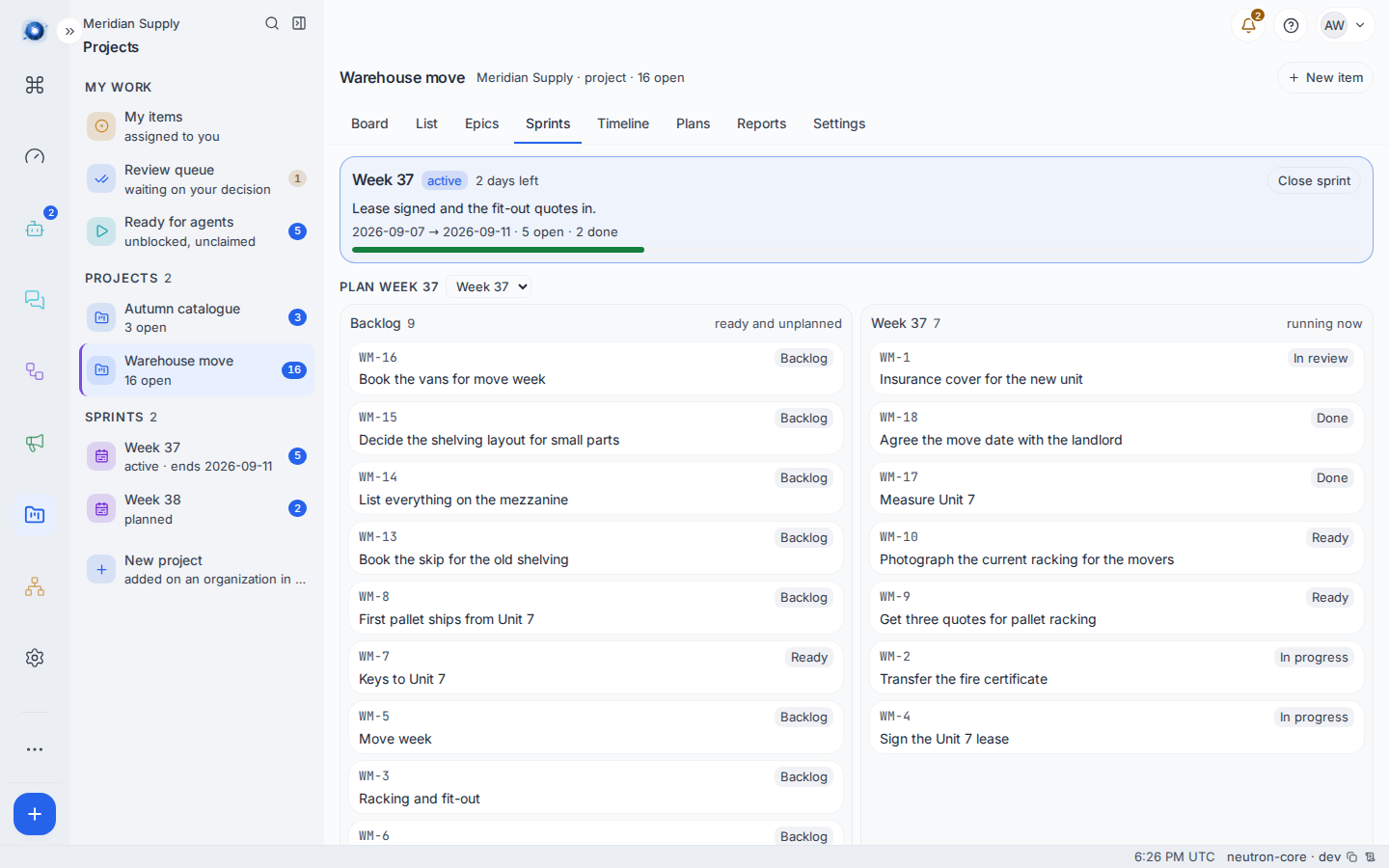
The middle of the screen is two columns. Backlog on the left holds the work that is ready and unplanned. The sprint is on the right. Drag a card across.
Only work that is in Backlog or Ready and not already in a sprint appears on the left. Something already being worked on is not something to plan.
3. Start it
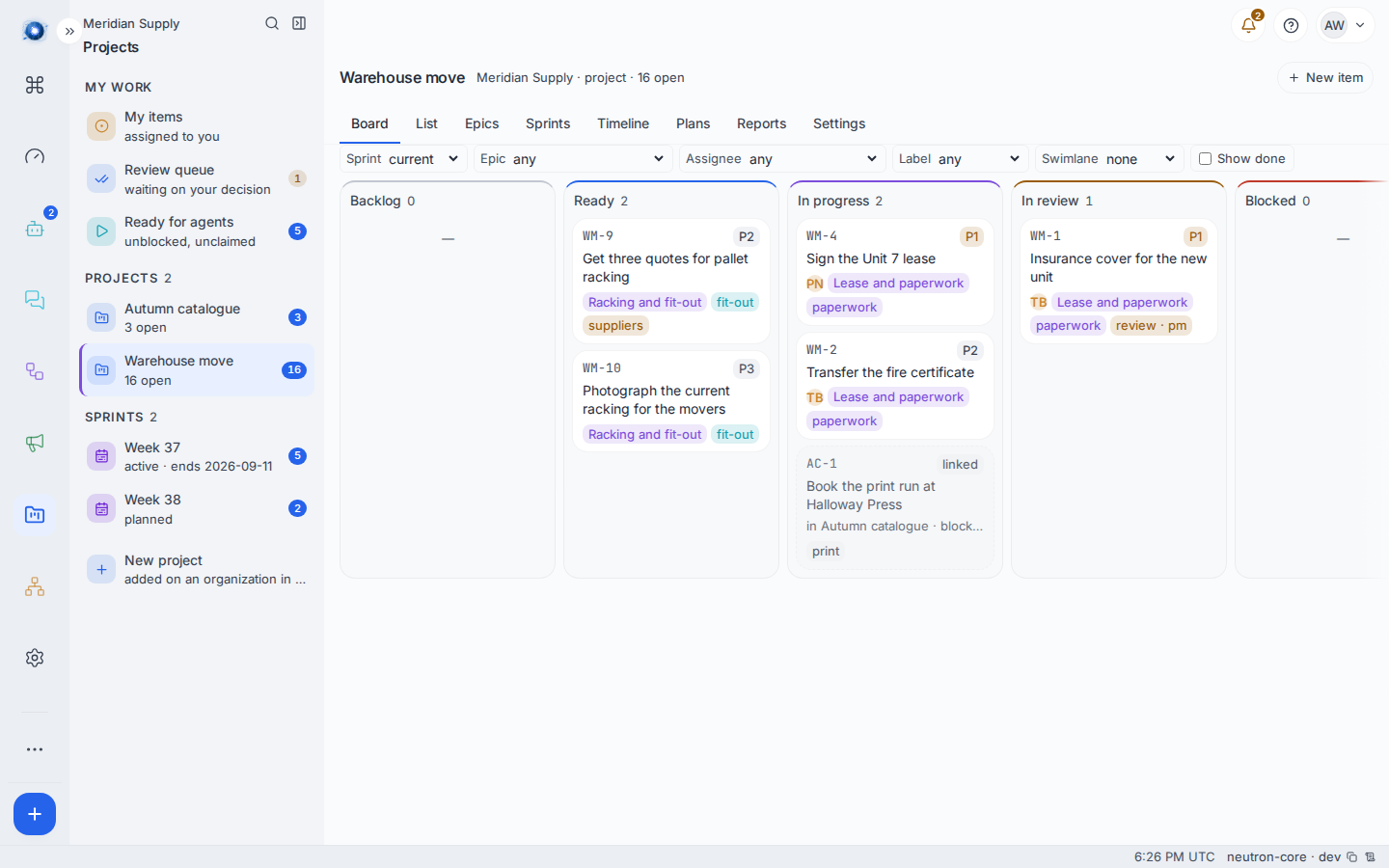
Press Start on the planned sprint. It becomes the active one, the header at the top of the screen changes to it, and the board’s Sprint filter now opens on it by default. A project has one active sprint.
4. Read the header while it runs
The active sprint’s header carries the goal you gave it, the dates, how many items are open and done, and a bar. 2 days left is the plain-English version of the end date, and it is what people actually look at.
5. Close it
Press Close sprint. A panel appears saying how many unfinished items have to go somewhere, and asks where:
| Choice | What happens |
|---|---|
| the next sprint (created if it does not exist) | Everything unfinished moves to the week after this one. If no such sprint exists, it is made. |
| A named planned sprint | Everything unfinished moves into that one. |
| the backlog | Everything unfinished leaves the sprints entirely and goes back to the pool. |
Press Close sprint again to confirm. Finished work stays where it is; the sprint moves to Closed and stops appearing in the rail.
Carried work keeps its order, so a list you spent time arranging arrives arranged.
A worked example
Meridian Supply runs one week at a time.
- Priya creates Week 37, 7 to 11 September, with the goal Lease signed and the fit-out quotes in.
- She drags five items across: the lease, the insurance, the fire certificate, the racking quotes and the photographs for the movers.
- She presses Start. The board’s Sprint filter now reads current and shows those five. She can do all of this because her row on Settings › People carries pm and reads instance write: manager.
- On Friday the header says 2 days left · 5 open · 2 done.
- She closes it and picks the next sprint. Three unfinished items land in Week 38 in the order she had them.
What can go wrong
| The sentence on screen | What happened, and what to do |
|---|---|
| No sprint yet. A sprint is a week this project committed to; start one below and drag work into it. | The project has never had one. Use the form at the bottom. |
| That sprint is already closed | Somebody closed it while you were looking. Reload the screen. |
| That sprint is no longer here — reloaded | It was deleted. The screen has caught up. |
| a sprint must end on or after it starts | The dates are the wrong way round. |
| a sprint name must be 1–120 characters | The name is empty or far too long. |
| That did not reach the server. | The request never arrived. Check the connection and try again. |
| The board is empty and says the sprint cannot be found | The board is filtered to a sprint that no longer exists. It offers Clear the sprint filter beside the message; press it. |
| forbidden when creating or closing a sprint | Making and closing sprints needs two things: the pm, admin or owner role on the project, and the instance-wide work-manager permission. Both are set on Settings › People; see journey 1. |
Confirm it worked: the sprint appears in the middle column with a count on it, and the board’s Sprint filter set to current shows exactly the work you dragged in.